
Printable Activities are currently in BETA. Generations are unlimited while in beta, for both Free and Premium accounts.
Available Activities
Roll & Read
A die-roll word grid of target-skill words for reading centers and partner work, with teacher and student directions included.
Sentence Fluency Pyramid
A one-page worksheet that builds a decodable sentence line by line, for repeated-reading fluency practice.
Fill in the Blank
A MAZE-style worksheet with 3–5 decodable sentences, each with one blank and three answer choices — students pick the word that fits.
Memory Match
Cut-apart picture and word cards (6 or 12 pairs) for a matching game at reading centers or with partners, with teacher directions and an answer key included.
Generating an Activity
1
Open the Activities tab
From the Generator page, click the Activities tab (next to Decodables).
2
Choose an activity
Pick Roll & Read, Memory Match, Sentence Fluency Pyramids, or Fill in the Blank.
3
Set your scope and sequence and skill
Choose the phonics program and skill the worksheet should align to.
LitLab’s AI does its best to build every sentence around target-skill words while keeping the writing natural and coherent.
4
Add a custom word (optional)
Add one word you want included — try a student’s name or a bonus vocabulary word. Roll & Read accepts as many custom words as you like: type them one at a time, or paste a comma-separated list and press Enter. For Roll & Read, also pick a grid size (16, 24, or 36 words). Memory Match has no custom words — its cards use words that have pictures. For Memory Match, pick the number of pairs instead: 6 (12 cards) or 12 (24 cards).
5
Generate and print
Click Generate, then Preview & Print to open the PDF in a new tab. Make sure pop-ups are allowed. You must be signed in to print, and printing uses a weekly print credit on Free accounts.
The “Sentence Fluency Pyramid” Format
Each pyramid builds a single sentence across 4 to 6 growing lines, starting short and building up to the full sentence. The AI does its best to only include words that are decodable up to the skill you choose, so nothing on the page falls outside what your students have already been taught (the sentence should include at least 1 target skill word). If you add a custom word, it’s woven into the sentence somewhere in the pyramid. Because each line builds on the words before it, students naturally re-read the same words again as the sentence grows — repeated reading built into a single page, no extra copies needed.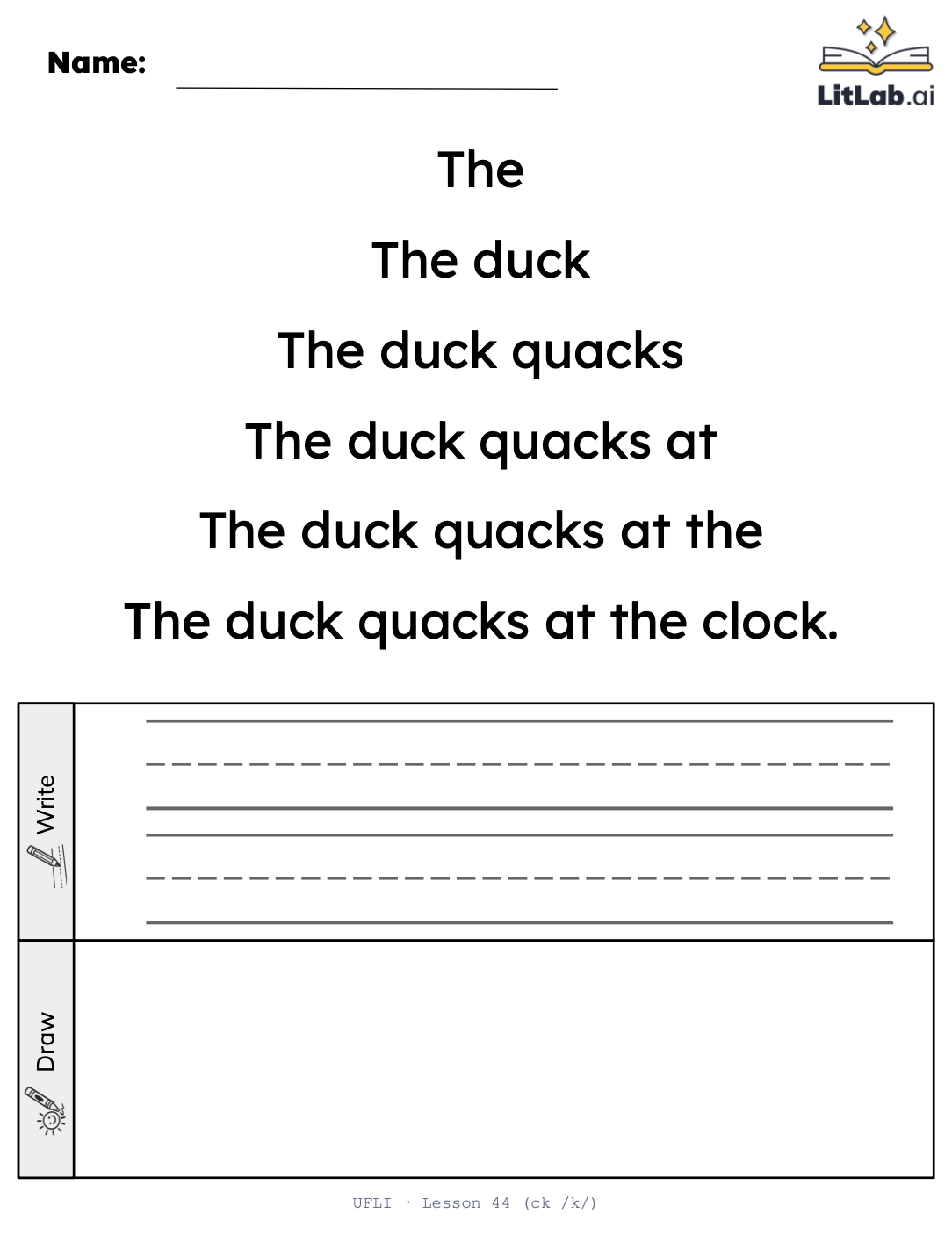
The “Fill in the Blank” Format
Each Fill in the Blank worksheet includes 3–5 decodable sentences, each missing one word. Students choose from three options: the correct answer and two phonetically similar distractors—near-misses like dip / dig / dim or hill / hull / hip. Each sentence should be decodable up to the skill you chose and include at least one target skill word. This design is intentional. Because the distractors are just as decodable as the correct answer, students must decode all three options and use the meaning of each word to determine which one makes sense in the sentence. The result is phonics practice and reading-for-meaning in the same worksheet. A ready-made answer key is included on page two.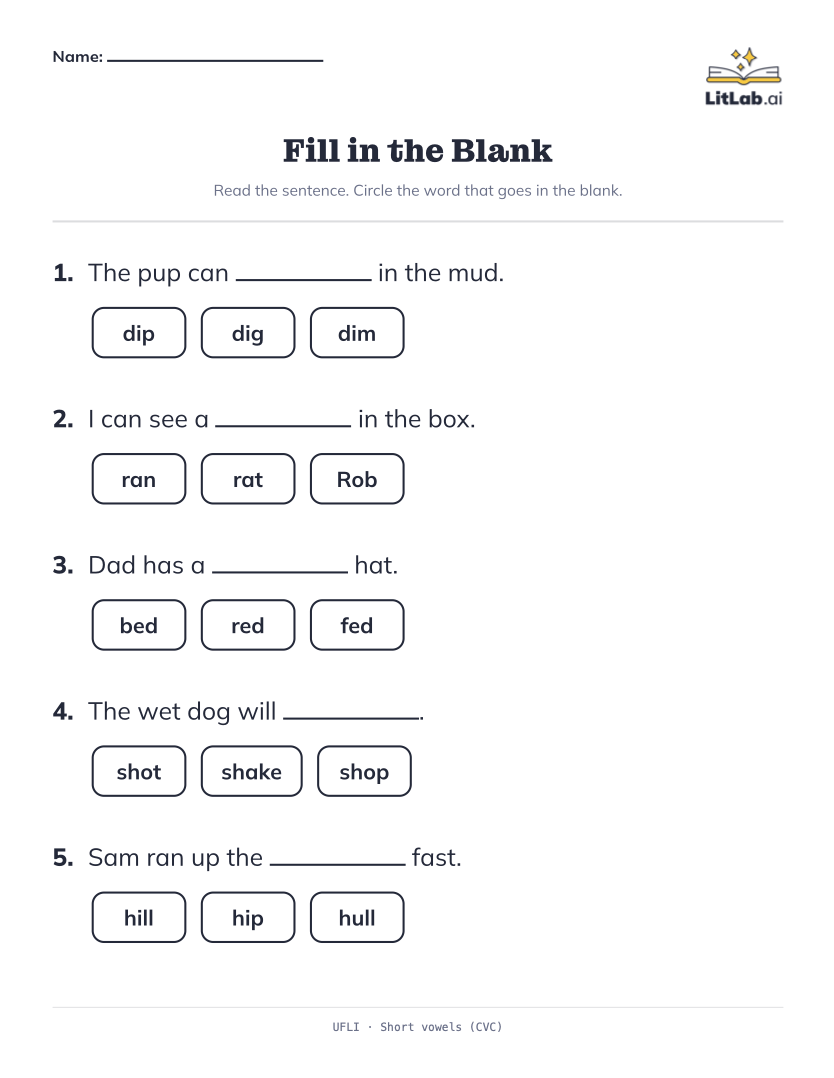
The “Roll & Read” Format
Roll & Read is a three-page PDF. Page one is the student grid: one column per die face, filled with target-skill words for the lesson you chose. Every custom word you add is placed in the grid. If a lesson has fewer target-skill words than the grid has cells, words repeat — extra repeated-reading practice. Students roll a die, find the matching column, and read a word aloud, then cover or highlight it. Page two has teacher directions plus game variations (partner race / 4-in-a-row, Battleship, and timed fluency). Page three has picture-supported student directions you can post at a reading center. On the 16-word grid there are only four columns, so students roll again on a 5 or 6.The “Memory Match” Format
Memory Match starts with the cards to cut apart on the dashed lines. Each card page has 12 cards: six picture cards and six word cards, making six pairs. Choose 6 pairs for one card page, or 12 pairs for two (labeled “Cards 1 of 2” and “Cards 2 of 2”). The words are target-skill words for the lesson you chose, and each picture comes from LitLab’s picture dictionary. The pictures and words are shuffled separately, so a word never sits in the same column as its picture. If the lesson doesn’t have enough target-skill words with pictures, the remaining pairs are filled with review words from the skills just before it, starting with the most recent one. If you asked for 12 pairs and there aren’t enough pictures, you’ll get a 6-pair set and a note saying only 6 pairs are available. If none of the lesson’s target-skill words have pictures yet, or there still aren’t enough words with pictures to make six pairs after adding review words, you’ll see a note asking you to choose an earlier skill for review — we’re adding pictures to more skills over time. Next come the teacher directions: the words in the set (review words are shaded, with a note naming the skills they come from), how to play, and other ways to use the cards — Go Fish, Spell it, Beat the timer, Category sort, Warm-up reads, and Take home. Tip: print on cardstock so the pictures don’t show through. The last page is an answer key showing every picture with its word. Show it to students before they play so they know which words match which pictures.Why Use It
- No story needed. Get skill-aligned practice material in seconds, without assigning a full story.
- Pictures support meaning. Memory Match pairs each target-skill word with a picture, so students connect decoding to what the word means.
- Built-in repetition. Sentence Fluency Pyramids grow line by line, so students re-read the same words again and again as the sentence builds — repeated reading without printing multiple copies.
- Comprehension, not just decoding. Fill in the Blank’s near-miss distractors mean students have to read for meaning, not just sound out letters — with an answer key built in.