
Side-by-Side Comparison
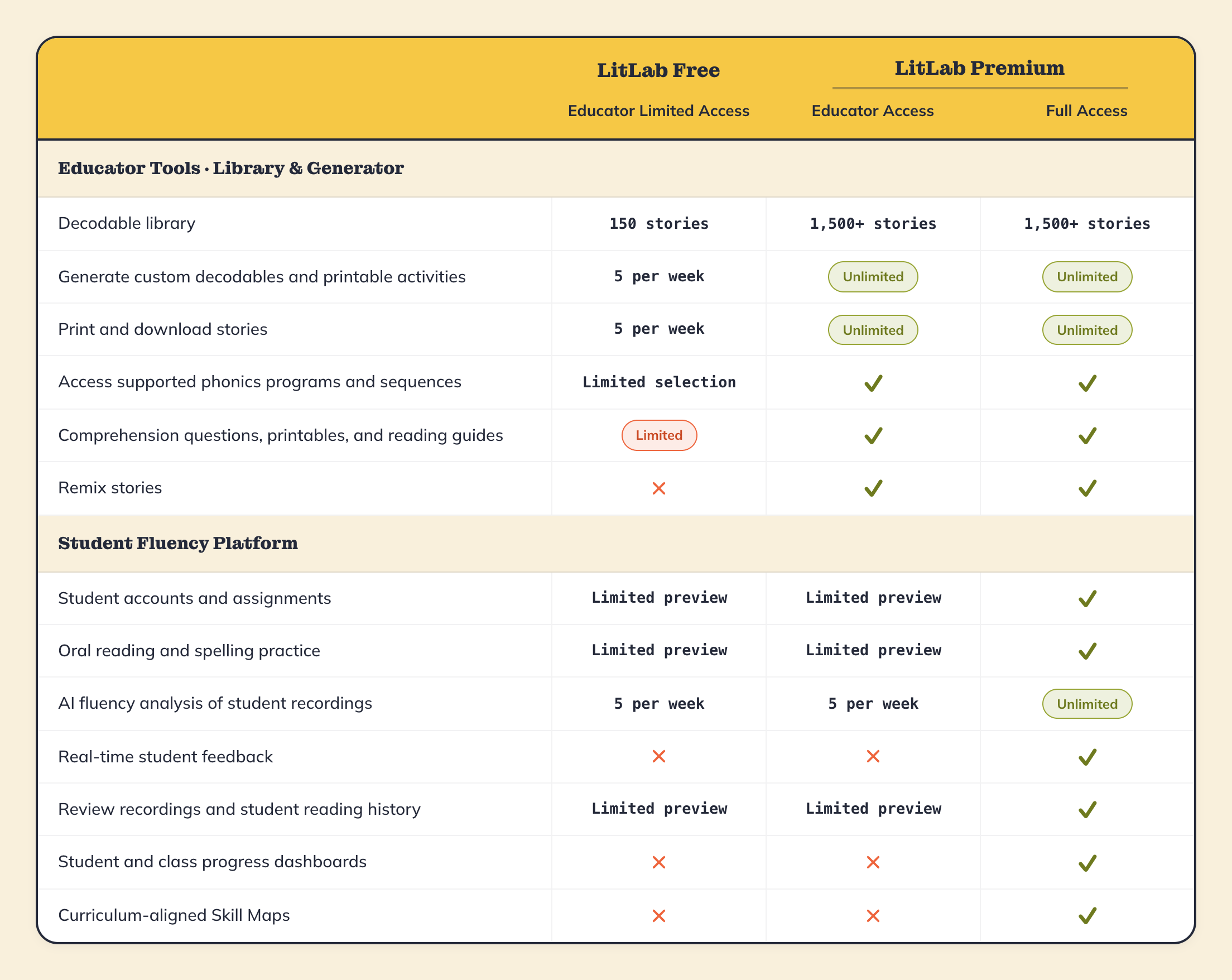
LitLab Free
LitLab Free is designed so any teacher can get started immediately, with no purchase required. Includes:- 150 stories from the Grab-and-Go decodable library, plus ~150 more when you invite 5 colleagues (see Refer colleagues)
- 5 custom decodables per week from the story generator
- 5 story prints/downloads per week — see Printables
- Limited selection of supported phonics programs and sequences
- Limited comprehension questions and printables
- Limited preview of the student fluency platform, including 5 AI fluency analyses per week
When you hit a weekly limit
Weekly print and generation limits reset every Saturday. When you run out of print or generation credits, LitLab shows a limit window with three choices:- Upgrade to Premium Educator Now opens the individual Premium Educator quote.
- Reset my weekly usage credits asks you a short survey about why you use LitLab. When you submit it, LitLab restores only the counter you ran out of (prints or generations). Your other weekly limits stay as they are.
- I’ll wait till Saturday closes the window. Your credits come back with the weekly reset.
Refer colleagues for more free stories
Free-tier teachers can double their Grab-and-Go access by inviting other educators. When teachers refer 5+ colleagues, LitLab unlocks an additional set of ~150 referral-only Grab-and-Go stories on your account, roughly doubling your free story count.- Locked stories in the library show either an envelope icon (unlocks by referral) or a Premium chip (requires a paid plan), so you can see at a glance which cards a referral will open.
- Referrals apply to the Grab-and-Go library only. They do not raise your weekly generation, printing, or AI fluency analysis limits, and they don’t unlock the full Premium library.
- Referral-unlocked stories reset at the start of each school year. Invite colleagues again in the new year to unlock the bonus set for that year.
LitLab Premium
LitLab Premium comes in two subscription options for schools and districts. Individual teachers can also buy a single Premium Educator seat (see Individual Premium Educator). See Products & Subscriptions for more detail.Educator Access
Everything educators need to find, create, and print decodable content:- Full 1,500+ story decodable library
- Unlimited custom decodable generation and printables
- All supported phonics programs and sequences
- Full comprehension questions, printables, and reading guides
- Remix stories
- Limited preview of the student fluency platform, including 5 AI fluency analyses per week
Full Access
Everything in Educator Access, plus the full Student Fluency Platform:- Unlimited student accounts and assignments
- Oral reading and spelling practice
- Unlimited AI fluency analysis of student recordings
- Real-time student feedback
- Full recording review and student reading history
- Student and class progress dashboards
- Curriculum-aligned Skill Maps
Pricing
School and district licenses
School and district licenses are annual site licenses. Pricing depends on your size and which subscription option you choose.- Request a quote for your school or district
- Email ops@litlab.ai if you’re unsure which plan fits
Individual Premium Educator
If you’re a single teacher, you can get one Premium Educator seat without a school-wide license. Premium Educator gives you the complete Library, unlimited printing, and unlimited generations for custom decodables and printable activities. It does not include student accounts for the Student Fluency Platform. To get an individual quote:- Go to litlab.ai/quote/individual. In the app, you can also select 🚀 Upgrade to Premium in your profile menu (or the mobile menu), then select Upgrade now. You can also select Get an individual Premium Educator subscription on the LitLab for Schools pricing page or in its FAQ.
- On You & your school, enter your contact details and your school.
- On the subscription step, confirm the one-teacher Premium Educator plan. The seat count is fixed at one.
- Review your details and submit to create your quote.