> ## Documentation Index
> Fetch the complete documentation index at: https://help.litlab.ai/llms.txt
> Use this file to discover all available pages before exploring further.
# Track Student Reading Progress
> Monitor student reading activity, review fluency data, and identify students who need additional support from your LitLab teacher dashboard.
The teacher dashboard brings together everything you need to monitor student reading progress. Review completed assignments, listen to student recordings, track fluency growth, and identify students who may benefit from additional instruction.
## What you can monitor
From the teacher dashboard, you can:
* Review completed student assignments
* Listen to student Read Aloud recordings
* View fluency metrics such as reading rate (WPM) and accuracy
* Monitor reading progress over time
* Identify students who may need additional practice or intervention
## Using the dashboard
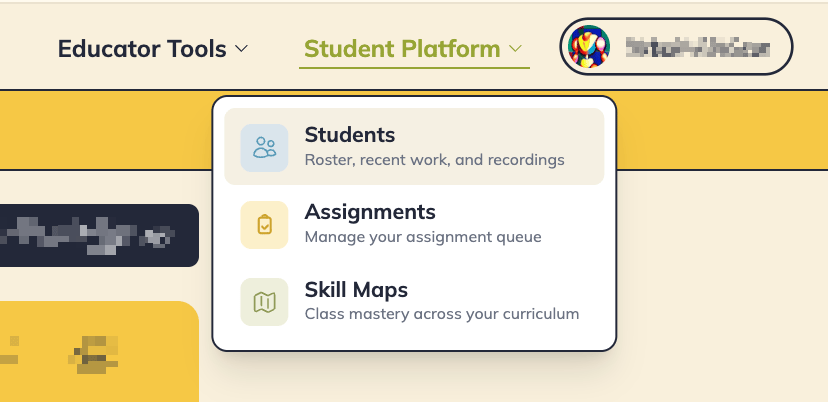
Sign in to LitLab. Under **Student Platform**, click **Students.** Select the class you'd like to review.
 See which students have completed assignments and which are still in progress.
 Press the arrow button on any student row to open up their recent assignments. View and listen to any completed Read Aloud recording and review LitLab's AI fluency analysis.
Use student reading data to form small groups, target phonics instruction, and assign additional decodable practice.
## Turn reading data into instruction
The dashboard helps you quickly answer questions like:
* Which students are completing assignments consistently?
* Who is reading accurately but needs to build fluency?
* Which students may need additional decoding support?
* Who is ready to move on to more advanced practice?
By combining assignment completion, fluency data, and student recordings in one place, LitLab helps you make informed instructional decisions without manually scoring oral reading.
Review student recordings regularly to spot decoding patterns that may not be obvious from fluency scores alone.
## Learn more
* [**AI Fluency Analysis**](/practice/ai-fluency-analysis) — Review recordings and AI-generated fluency insights.
* [**Managing Assignments**](/practice/managing-assignments) — Monitor assignment completion and student progress.
* [**Class Reports**](/progress/class-reports) — View student mastery across your phonics scope and sequence.
Press the arrow button on any student row to open up their recent assignments. View and listen to any completed Read Aloud recording and review LitLab's AI fluency analysis.
Use student reading data to form small groups, target phonics instruction, and assign additional decodable practice.
## Turn reading data into instruction
The dashboard helps you quickly answer questions like:
* Which students are completing assignments consistently?
* Who is reading accurately but needs to build fluency?
* Which students may need additional decoding support?
* Who is ready to move on to more advanced practice?
By combining assignment completion, fluency data, and student recordings in one place, LitLab helps you make informed instructional decisions without manually scoring oral reading.
Review student recordings regularly to spot decoding patterns that may not be obvious from fluency scores alone.
## Learn more
* [**AI Fluency Analysis**](/practice/ai-fluency-analysis) — Review recordings and AI-generated fluency insights.
* [**Managing Assignments**](/practice/managing-assignments) — Monitor assignment completion and student progress.
* [**Class Reports**](/progress/class-reports) — View student mastery across your phonics scope and sequence.