> ## Documentation Index
> Fetch the complete documentation index at: https://help.litlab.ai/llms.txt
> Use this file to discover all available pages before exploring further.
# Reporting: Analyze Student Progress
> Use LitLab Skill Maps and student reading history to monitor phonics mastery, track oral reading fluency growth, and export student data.
LitLab's progress monitoring tools give you a deeper look at student progress beyond the day-to-day teacher dashboard. Use Skill Maps to identify phonics strengths and gaps across your class, or open an individual student's reading history to review every completed reading session.
## Skill Maps
Skill Maps provide a curriculum-aligned view of phonics mastery across your class. Skills are organized according to your selected scope and sequence, making it easy to identify which skills students have mastered and which may need additional instruction.
### Accessing Skill Maps
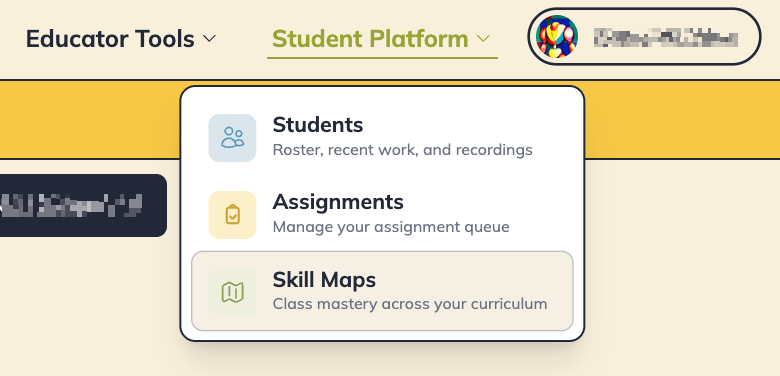
From the teacher dashboard, click the **Skill Maps** tab.
 Scan the class to identify patterns, compare student progress, and determine which phonics skills may need reteaching or additional practice.
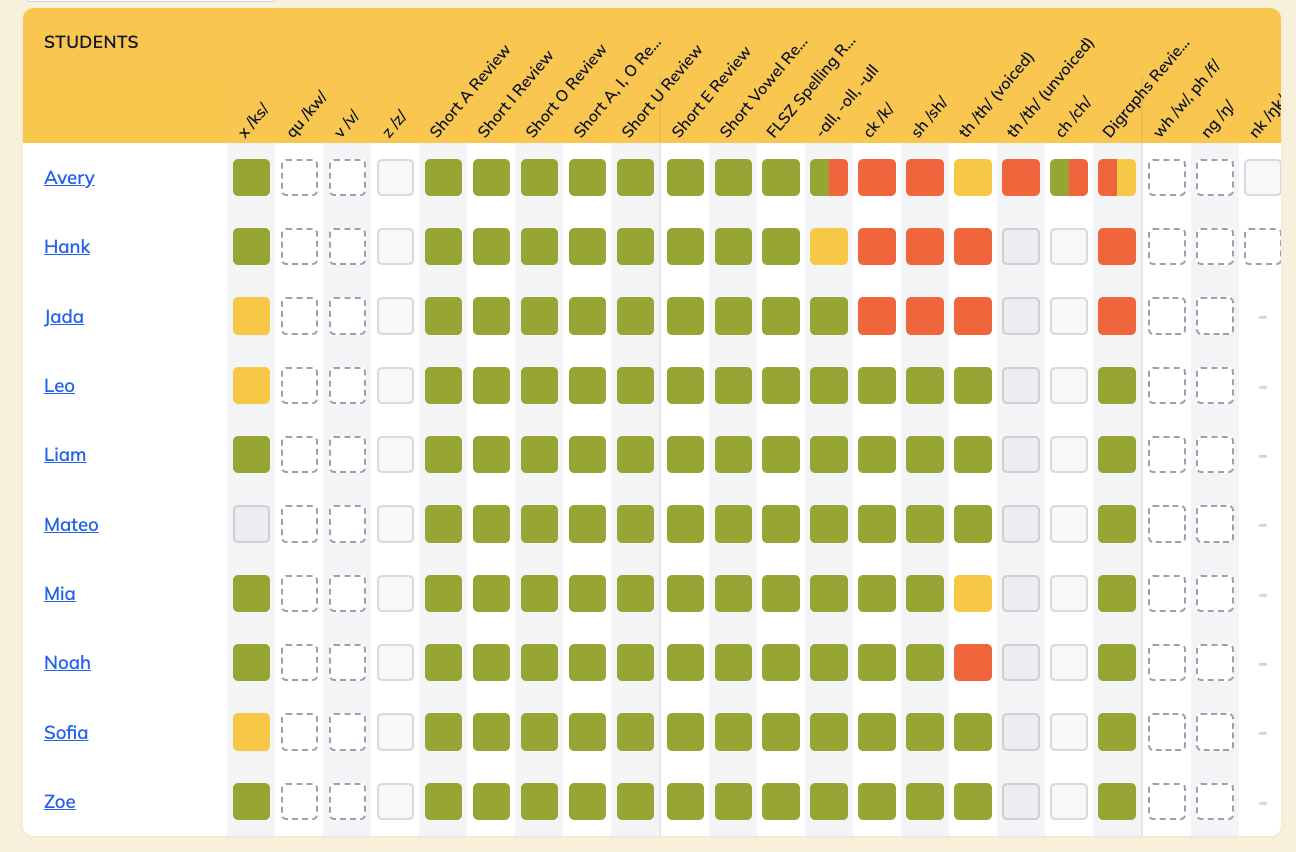 Skill Maps show progress mapped back to your selected, [default scope and sequence](/account/teacher-settings#default-scope-and-sequence).
Skill Maps can help you:
* Monitor mastery across your phonics curriculum
* Identify class-wide trends and instructional gaps
* Plan small groups based on student needs
* Track growth as students complete additional practice
***
## Full Student Reading History
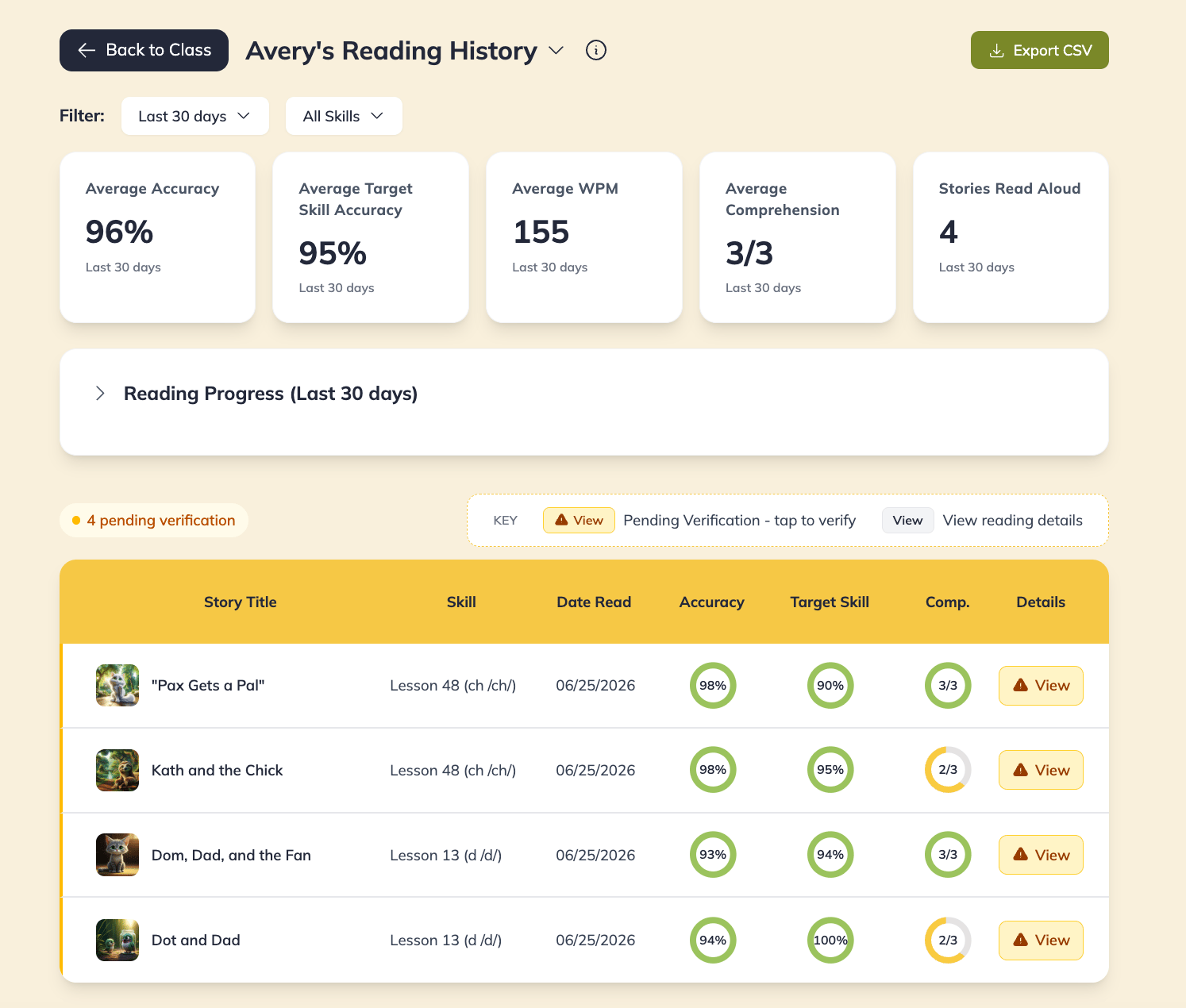
Each student has a complete history of every reading session completed in LitLab, including fluency data and assignment activity.
From a student's reading history, you can review:
* Completed stories, with their phonics skill and scope/sequence alignment
* Reading rate (WPM) and accuracy, including target-skill accuracy
* Comprehension results
* Correct and incorrect words
* The date each story was read
* Filter by skill to monitor growth over time
WPM is intentionally left blank (not shown as 0%) for readings where it couldn't be reliably measured — Silent Reading assignments, for example, won't have a WPM score.
Click **View** on any row to open the recording player and review LitLab's AI fluency analysis for that reading.
Skill Maps show progress mapped back to your selected, [default scope and sequence](/account/teacher-settings#default-scope-and-sequence).
Skill Maps can help you:
* Monitor mastery across your phonics curriculum
* Identify class-wide trends and instructional gaps
* Plan small groups based on student needs
* Track growth as students complete additional practice
***
## Full Student Reading History
Each student has a complete history of every reading session completed in LitLab, including fluency data and assignment activity.
From a student's reading history, you can review:
* Completed stories, with their phonics skill and scope/sequence alignment
* Reading rate (WPM) and accuracy, including target-skill accuracy
* Comprehension results
* Correct and incorrect words
* The date each story was read
* Filter by skill to monitor growth over time
WPM is intentionally left blank (not shown as 0%) for readings where it couldn't be reliably measured — Silent Reading assignments, for example, won't have a WPM score.
Click **View** on any row to open the recording player and review LitLab's AI fluency analysis for that reading.
 ### Accessing a student's reading history
Click a student's name from the teacher dashboard, or open their row and click **View full history**.
Browse the student's complete reading history to monitor progress over time and identify growth or areas needing support.
Export the student's reading history as a CSV for additional analysis, documentation, or sharing with your school team.
Student reading history is especially useful for:
* Monitoring intervention progress
* Preparing for MTSS, RTI, or parent conferences
* Reviewing long-term fluency growth
* Maintaining documentation of student reading performance
Use Skill Maps to identify **which skills** students need to practice, then review an individual student's reading history to understand **how their reading performance has changed over time**.
## Export an individual student's reading history
Need to share a student's reading progress with a parent or keep a record for your own files? You can export a CSV of a single student's **Full Reading History** — including the stories they've read, reading accuracy, incorrect words, and more — without exposing any other student's data.
From the Teacher Dashboard, click on the student's name.
Narrow the results by date range or a specific phonics skill.
Click **Export CSV** to download that student's reading history.
A single-student Skill Map export isn't available yet. For parent-facing summaries, the Full Reading History CSV is the best way to share one student's data without showing classmates' information.
## Learn more
* [**Teacher Dashboard**](/progress/teacher-dashboard) — Monitor daily student activity and recent assignments.
* [**AI Fluency Analysis**](/practice/ai-fluency-analysis) — Listen to student recordings and review AI-generated fluency insights.
* [**Managing Assignments**](/practice/managing-assignments) — Track assignment completion and student progress.
### Accessing a student's reading history
Click a student's name from the teacher dashboard, or open their row and click **View full history**.
Browse the student's complete reading history to monitor progress over time and identify growth or areas needing support.
Export the student's reading history as a CSV for additional analysis, documentation, or sharing with your school team.
Student reading history is especially useful for:
* Monitoring intervention progress
* Preparing for MTSS, RTI, or parent conferences
* Reviewing long-term fluency growth
* Maintaining documentation of student reading performance
Use Skill Maps to identify **which skills** students need to practice, then review an individual student's reading history to understand **how their reading performance has changed over time**.
## Export an individual student's reading history
Need to share a student's reading progress with a parent or keep a record for your own files? You can export a CSV of a single student's **Full Reading History** — including the stories they've read, reading accuracy, incorrect words, and more — without exposing any other student's data.
From the Teacher Dashboard, click on the student's name.
Narrow the results by date range or a specific phonics skill.
Click **Export CSV** to download that student's reading history.
A single-student Skill Map export isn't available yet. For parent-facing summaries, the Full Reading History CSV is the best way to share one student's data without showing classmates' information.
## Learn more
* [**Teacher Dashboard**](/progress/teacher-dashboard) — Monitor daily student activity and recent assignments.
* [**AI Fluency Analysis**](/practice/ai-fluency-analysis) — Listen to student recordings and review AI-generated fluency insights.
* [**Managing Assignments**](/practice/managing-assignments) — Track assignment completion and student progress.