> ## Documentation Index
> Fetch the complete documentation index at: https://help.litlab.ai/llms.txt
> Use this file to discover all available pages before exploring further.
# Spanish Support for Multilingual Students
> Turn on Spanish Support to give a student comprehension questions, directions, and navigation in Spanish while they read English decodables.
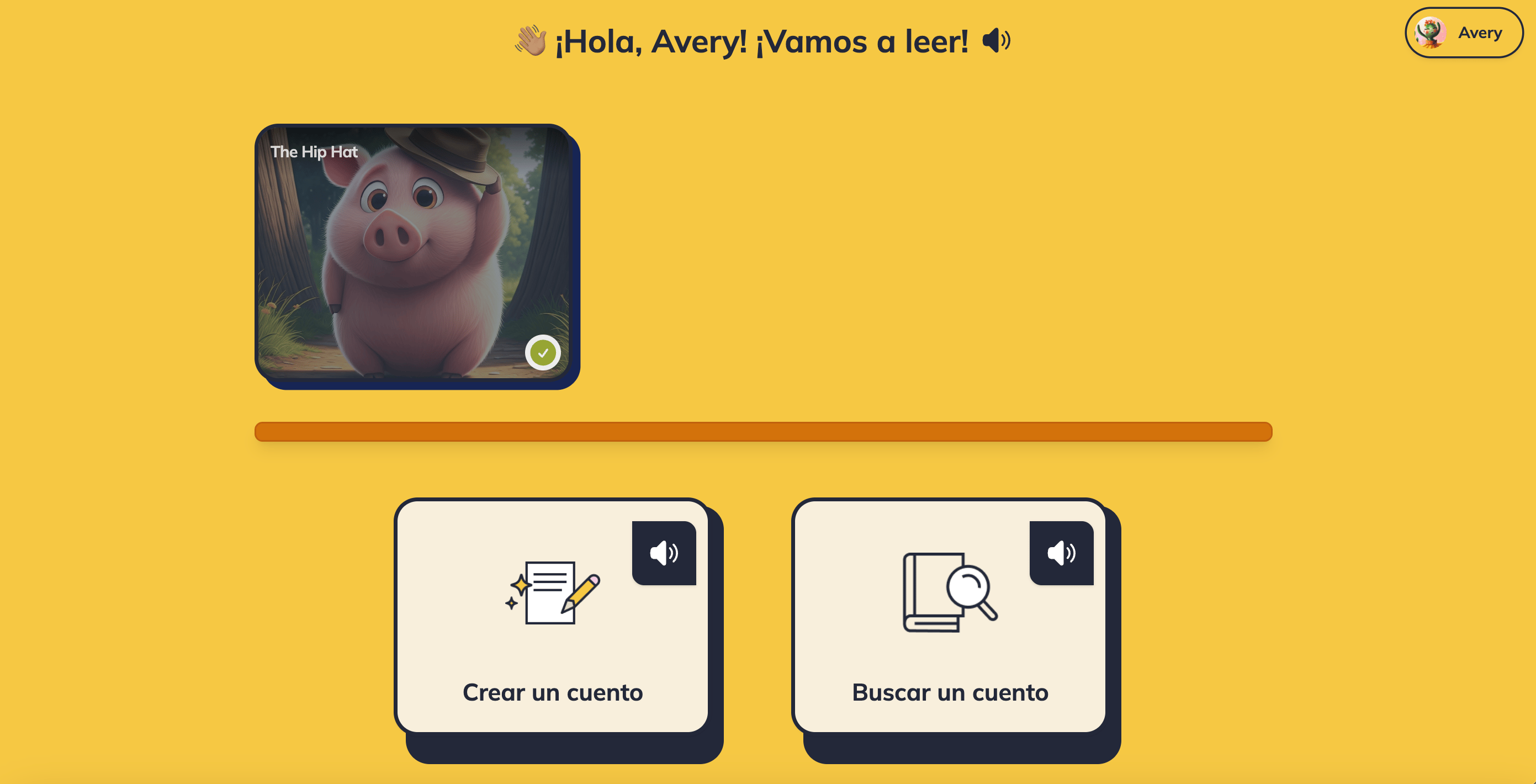
Spanish Support gives a student their comprehension questions, spoken directions, and navigation in Spanish while they read English decodables. You turn it on for one student at a time from your dashboard, and it takes effect the next time that student signs in.
Questions, answer choices, and their read-aloud audio play in Spanish.
Spoken directions, microphone setup, and student menus appear in Spanish.
Print the comprehension questions as a Spanish handout.
 ***
## Turn On Spanish Support
Spanish Support is set per student — there's no class-wide switch, and students can't turn it on themselves.
Go to your **Dashboard** and select the class from the class dropdown.
Find the student in your roster and click the **three-dot button** at the end of their row.
Toggle **Spanish Support** on. It saves right away — there's no Save button.
If you have read-only access to a class, the three-dot button won't appear. Ask the primary teacher to change the setting.
***
## What Changes for the Student
Spanish Support translates the instructions and questions around a decodable, not the decodable itself.
| Part of the reading session | Language |
| ------------------------------------------------------------------------ | -------- |
| **Comprehension questions** — text, answer choices, and read-aloud audio | Spanish |
| **Spoken directions** — microphone setup, end-of-story prompts | Spanish |
| **Navigation** — student landing page, Find a Story | Spanish |
| **Spelling activity directions** | Spanish |
| **The decodable text itself** | English |
| **Story narration and title audio** | English |
| **Tap-a-word definitions** — word, syllables, and audio | English |
| **The spelling words** | English |
***
## Turn On Spanish Support
Spanish Support is set per student — there's no class-wide switch, and students can't turn it on themselves.
Go to your **Dashboard** and select the class from the class dropdown.
Find the student in your roster and click the **three-dot button** at the end of their row.
Toggle **Spanish Support** on. It saves right away — there's no Save button.
If you have read-only access to a class, the three-dot button won't appear. Ask the primary teacher to change the setting.
***
## What Changes for the Student
Spanish Support translates the instructions and questions around a decodable, not the decodable itself.
| Part of the reading session | Language |
| ------------------------------------------------------------------------ | -------- |
| **Comprehension questions** — text, answer choices, and read-aloud audio | Spanish |
| **Spoken directions** — microphone setup, end-of-story prompts | Spanish |
| **Navigation** — student landing page, Find a Story | Spanish |
| **Spelling activity directions** | Spanish |
| **The decodable text itself** | English |
| **Story narration and title audio** | English |
| **Tap-a-word definitions** — word, syllables, and audio | English |
| **The spelling words** | English |
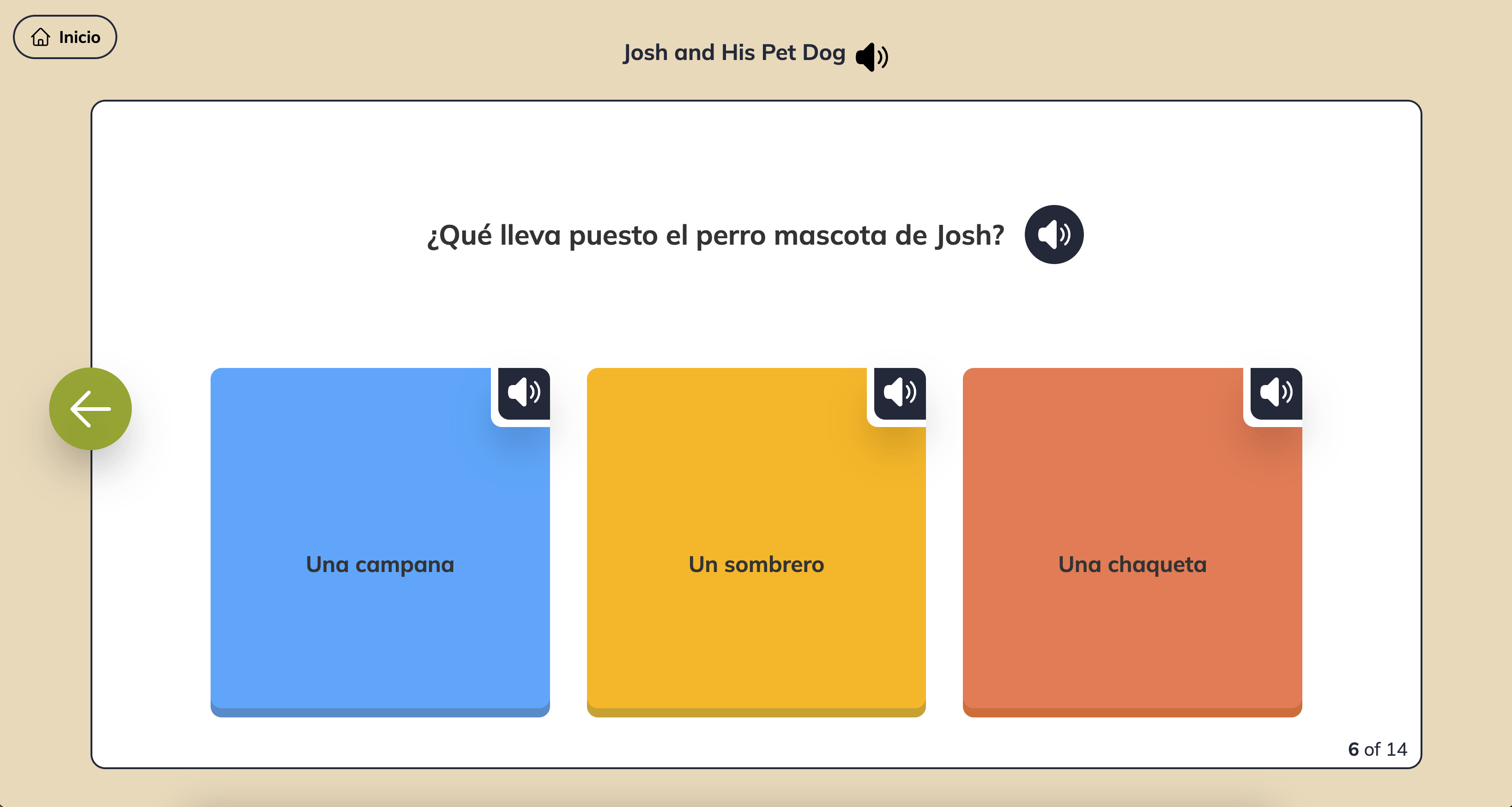 **LitLab's decodables are written in English.** Every story is built on an English phonics scope and sequence, so the text a student decodes is always English — Spanish Support translates the scaffolding around the text, never the text itself. For a student who reads only in Spanish, it lowers the language barrier to the task without changing what's being practiced: English decoding.
***
## Preview Spanish Questions Before You Assign
Open any story and expand **Comprehension Questions**. When a Spanish set exists, you'll see an **English / Spanish (US)** toggle and an **EN** or **ES-US** badge.
That toggle is a preview for you. It swaps the questions on screen and gives you the Spanish version of the printable — but it doesn't change what your students see. A student's language is controlled only by the **Spanish Support** setting on their row of your roster.
Don't see the toggle? That story doesn't have a Spanish question set yet, so students with Spanish Support on will see its questions in English.
***
## Frequently Asked Questions
No. The library and the generator produce English decodables, because they're built on English phonics scope and sequences. Spanish Support makes those texts more accessible — it doesn't replace them with Spanish ones.
No. Story narration and the story title are always in English. The comprehension questions and the spoken directions are what play in Spanish.
No. Spanish Support is available on every LitLab account.
No. Students still read English text aloud, so their recordings are scored exactly the same way — words per minute, accuracy, and target-skill accuracy are unaffected.
***
## Related Articles
* [Teacher Settings](/account/teacher-settings)
* [Oral Reading Fluency](/practice/oral-reading-fluency)
* [Decodable Texts](/concepts/decodable-texts)
**LitLab's decodables are written in English.** Every story is built on an English phonics scope and sequence, so the text a student decodes is always English — Spanish Support translates the scaffolding around the text, never the text itself. For a student who reads only in Spanish, it lowers the language barrier to the task without changing what's being practiced: English decoding.
***
## Preview Spanish Questions Before You Assign
Open any story and expand **Comprehension Questions**. When a Spanish set exists, you'll see an **English / Spanish (US)** toggle and an **EN** or **ES-US** badge.
That toggle is a preview for you. It swaps the questions on screen and gives you the Spanish version of the printable — but it doesn't change what your students see. A student's language is controlled only by the **Spanish Support** setting on their row of your roster.
Don't see the toggle? That story doesn't have a Spanish question set yet, so students with Spanish Support on will see its questions in English.
***
## Frequently Asked Questions
No. The library and the generator produce English decodables, because they're built on English phonics scope and sequences. Spanish Support makes those texts more accessible — it doesn't replace them with Spanish ones.
No. Story narration and the story title are always in English. The comprehension questions and the spoken directions are what play in Spanish.
No. Spanish Support is available on every LitLab account.
No. Students still read English text aloud, so their recordings are scored exactly the same way — words per minute, accuracy, and target-skill accuracy are unaffected.
***
## Related Articles
* [Teacher Settings](/account/teacher-settings)
* [Oral Reading Fluency](/practice/oral-reading-fluency)
* [Decodable Texts](/concepts/decodable-texts)